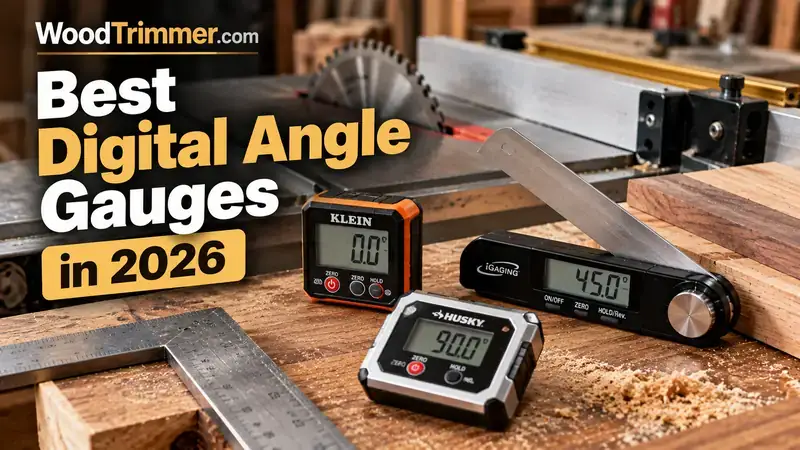
Best Digital Angle Gauges for Woodworking in 2026
A digital angle gauge can turn a vague saw-scale setting into a measurable reference. For woodworking, that is especially useful when setting table-saw bevels, checking miter-saw angles, aligning a jointer fence or transferring an angle that is difficult to read accurately from a traditional scale.
Quick Picks
| Pick | Best for | Why it stands out |
|---|---|---|
| Wixey WR300 Type 2 | Best Overall | Purpose-built magnetic machine setup with 0.1° resolution and relative zeroing. |
| Klein Tools 935DAG | Best Rugged Value | Compact digital level/angle gauge with strong magnetic base and dual ranges. |
| GemRed 82305 | Best for Long-Angle Layout | Long stainless-steel arms combine angle measurement and physical layout. |
Why Digital Angle Gauges Are Useful in Woodworking
Factory scales on woodworking machines are convenient, but they are not always the final authority. A digital gauge lets you establish a reference directly from the machine surface and then read the actual relationship between the reference and the blade, fence or table.
That makes a digital gauge particularly useful for bevel setup, angle verification and repeatable adjustments. It can also expose a problem that a machine’s printed scale cannot: the machine may say 45°, while the actual blade or fence is slightly elsewhere.
The 3 Best Digital Angle Gauges for Woodworking
1. Wixey WR300 Type 2 Digital Angle Gauge
Best for: table-saw and miter-saw bevel setup

The strongest all-around choice when the main job is setting and checking bevel angles on a table saw, miter saw, jointer fence or similar machine.
Check Price on AmazonKey specifications
- ±180° range
- 0.1° resolution
- ±0.2° stated accuracy
- ±0.1° stated repeatability
- Magnetic base
- Zero function for setting a relative reference
- Backlit display
- Single AAA battery
- Purpose-built around machine setup
- Magnetic base is useful on ferromagnetic saw blades
- Zero function makes relative setup straightforward
- Backlight improves visibility in a busy shop
- Best suited to machine setup rather than long-angle transfer work
- Digital accuracy does not remove the need to verify the saw itself
- The small form factor can be less useful for measuring large workpieces
2. Klein Tools 935DAG Digital Angle Gauge and Level
Best for: general workshop angle checks and machine setup

A particularly useful choice if the same gauge will serve both woodworking machines and general workshop measurement.
Check Price on AmazonKey specifications
- 0–90° and 0–180° measurement ranges
- ±0.1° stated accuracy near 0°, 90° and 180°
- ±0.2° stated accuracy at other angles
- Permanent rare-earth magnetic base
- Reverse-contrast display
- Auto-rotating display
- IP42 water and dust resistance
- 2 AAA batteries
- Useful combination of angle gauge and digital level
- Strong magnetic base works well on steel machine surfaces
- Easy-to-read display
- Compact and rugged workshop form
- Not specifically designed only for woodworking
- V-groove features are more relevant to pipe/conduit work than most woodworking tasks
- Accuracy varies by angle according to the manufacturer's specification
3. GemRed 82305 Digital Angle Finder Protractor
Best for: transferring and measuring angles on larger workpieces
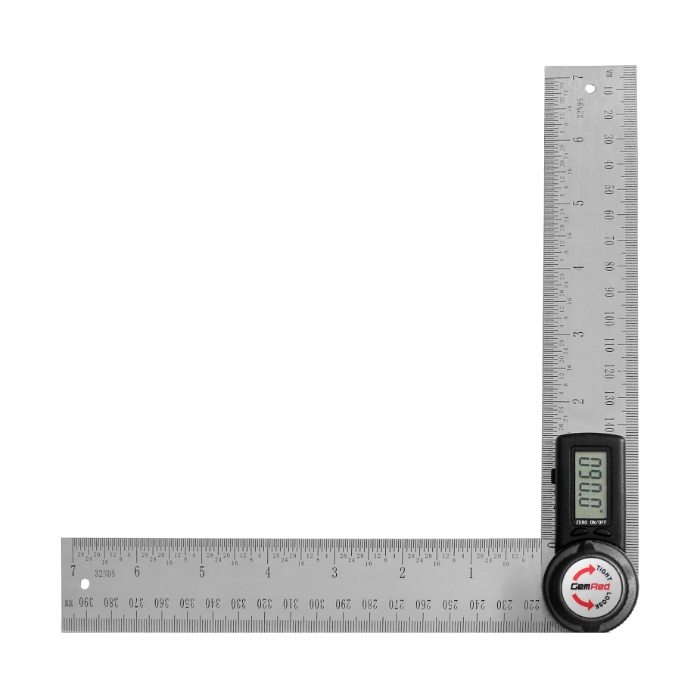
The best fit when your woodworking requires measuring, transferring or locking larger angles rather than simply checking a saw blade bevel.
Check Price on AmazonKey specifications
- 0–360° measurement range
- 0.1° resolution
- ±0.3° stated accuracy
- 218 mm / approximately 8.6-inch 82305-200D version
- Stainless-steel measuring arms
- Inside and outside angle measurement
- Locking screw
- CR2032 battery
- Long arms make it more useful for workpiece angle measurement
- Combines angle measurement with a physical ruler
- Locking screw helps preserve a measured angle
- Useful for both inside and outside corners
- Not as compact as a cube-style machine gauge
- Stated ±0.3° accuracy is lower than the best machine-setup gauges in this guide
- Long-arm design is less convenient for tight machine spaces
Digital Angle Gauge vs. Digital Angle Finder
The terms are often used interchangeably, but the physical designs solve different problems.
| Tool type | Typical woodworking job | Strength |
|---|---|---|
| Magnetic digital angle gauge | Table-saw blade bevel, miter-saw bevel, jointer fence | Fast machine setup from a known reference |
| Long-arm digital angle finder | Inside/outside angles, transferring an angle between workpieces | Reaches across larger surfaces |
| Traditional bevel gauge | Copying and transferring an angle | No battery and direct physical reference |
| Precision square | Checking 90° relationships | Simple physical reference with no electronics |
Accuracy, Resolution and Repeatability
Do not treat a display that reads 0.1° as proof that the tool is accurate to 0.1°. Resolution tells you how finely the display reports the measurement. Accuracy tells you how close the measurement is to the actual angle. Repeatability tells you how consistently the tool gives the same result when the same setup is repeated.
For example, Wixey specifies 0.1° resolution, ±0.2° accuracy and ±0.1° repeatability for the WR300 Type 2. Klein specifies different accuracy ranges for different angle regions on the 935DAG. GemRed specifies 0.1° resolution and ±0.3° accuracy for the 82305.
How to Use a Digital Angle Gauge on a Table Saw
1. Clean the reference surface
Sawdust or a chip between the gauge and the table can change the reading. Precision setup starts with clean contact surfaces.
2. Zero on the correct reference
Place the gauge on the saw table or another known reference and zero it when the design calls for relative measurement. Do not assume the shop floor or machine table is globally level just because it looks level.
3. Place the gauge consistently
When checking a blade, use the same part of the blade and avoid placing the gauge on teeth or an uneven surface. The magnetic base should sit securely.
4. Make the adjustment
Adjust the blade or fence slowly, watching the reading. The gauge turns a visual adjustment into a measurable target.
5. Recheck after locking
The final tightening step can move a fence or blade slightly. Check the reading again after the adjustment is locked.
Why Zeroing Matters More Than the Number on the Display
Many woodworking setups are relative rather than absolute. You do not necessarily need to know that a machine table is perfectly level with the earth. You need to know the angle of the blade relative to the table.
That is why the zero function is so useful. Establish the reference first, then measure the difference. Wixey specifically describes zeroing the gauge against a reference surface, and Klein provides a zero-calibration function for relative angle checks.
Digital Gauge vs. Machine Scale
| Method | Speed | Repeatability | Best use |
|---|---|---|---|
| Factory bevel scale | Very fast | Depends on machine calibration | Quick rough setup |
| Digital angle gauge | Fast | Strong when zeroed consistently | Precision machine setup |
| Precision square | Fast at 90° | Very strong for square checks | 90° verification |
| Test cut | Slowest | Depends on the entire setup | Final practical confirmation |
Common Mistakes When Using Digital Angle Gauges
- Putting the gauge on a dirty or uneven surface.
- Failing to zero the gauge before a relative measurement.
- Placing a magnetic gauge on saw teeth rather than a flat blade surface.
- Assuming the displayed resolution equals actual accuracy.
- Adjusting a machine and failing to recheck after tightening the locking mechanism.
- Using an angle gauge to diagnose a parallelism problem that requires a different tool.
- Relying on one electronic reading without confirming a critical joinery setup with the actual workpiece.
Who Should Buy a Digital Angle Gauge?
Buy one if: you regularly set table-saw bevels, miter-saw angles, jointer fences, drill-press tables or other machine angles and want a faster repeatable reference.
You may not need one yet if: your projects are mostly simple 90° cuts, you already have reliable physical setup tools, or your machines are rarely adjusted.
Frequently Asked Questions
What is the best digital angle gauge for woodworking?
The Wixey WR300 Type 2 is the strongest overall choice in this guide because its design is closely aligned with machine setup and it combines magnetic mounting, zeroing, 0.1° resolution and stated repeatability.
Can a digital angle gauge set a table saw to 45°?
Yes. Zero the gauge against the saw table, place it consistently against the blade, and adjust until the desired angle is reached. Recheck after tightening the blade mechanism.
Is 0.1° accuracy enough for woodworking?
For many woodworking machine setups, it is more than sufficient—but the important distinction is between 0.1° resolution and actual accuracy. The rest of the machine setup still matters.
Can a digital angle gauge replace a combination square?
No. A digital angle gauge is excellent for measuring and setting angles, but a good square remains valuable for physical 90° verification, layout and checking relationships between surfaces.
What is the difference between Wixey and Klein digital angle gauges?
Both are compact magnetic angle gauges. Wixey is particularly focused on woodworking-machine setup, while Klein combines angle measurement with a rugged digital-level format designed for broader trade use.
Is a long-arm digital angle finder better for woodworking?
It is better for some jobs, especially measuring and transferring larger inside or outside angles. For a table-saw blade, however, a compact magnetic cube-style gauge is generally easier to position.
Final Verdict
The Wixey WR300 Type 2 is the best overall choice for a precision-focused woodworking shop because its workflow is built around machine angle setup rather than general construction measurement.
The Klein Tools 935DAG is the better choice if you want one rugged gauge that can serve woodworking and other workshop tasks. The GemRed 82305 wins when the job involves larger angles, inside/outside measurements and physical angle transfer.
The bigger WoodTrimmer lesson is simple: use the gauge to establish a measurable reference, not to replace good machine alignment. Clean the contact surface, zero consistently, adjust carefully, lock the machine, and verify again.
Related WoodTrimmer Guides
- Different Types of Measuring Tools
- 8 Best Woodworking Layout Tools of 2026
- Woodworking Square Tools
- Woodworking Scribe Tools
- List of Tools for Woodworking
Publishing Checklist
- Confirm Amazon availability before publishing.
- Keep the affiliate disclosure visible near the beginning.
- Check that all three Amazon links retain
tag=shahedru-20. - Confirm all three product images load correctly after pasting into WordPress.
- Use the supplied low-resolution WebP as the featured image.
- Add the article to the appropriate WoodTrimmer measurement/machine-setup category.
- After publication, add the final live URL to future internal-link planning.
Editorial note: This guide intentionally avoids invented prices, ratings and hands-on testing claims. Product listings and specifications can change.